• Yealink SkySound – Pro AV Solution

    Yealink SkySound – Pro AV Solution

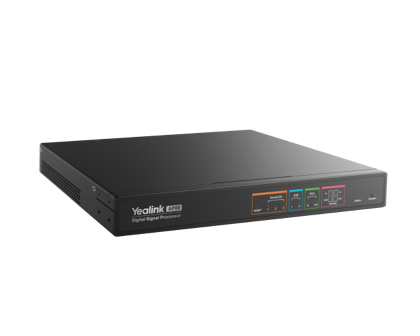
    Die neue Pro AV Serie von Yealink macht die perfekte Integration von professionellen Audiofeatures mit Microsoft Teams Rooms möglich. Es stehen verschiedene Deckenmikrofone und Lautsprecher zur Auswahl. Zusammen mit dem DSP1 AP08 können so auch komplexe Anforderungen problemlos umgesetzt werden.

    1. Digital Signal Processor ↩︎


  • NAPS2 – Free Scanner Software

    NAPS2 – Free Scanner Software

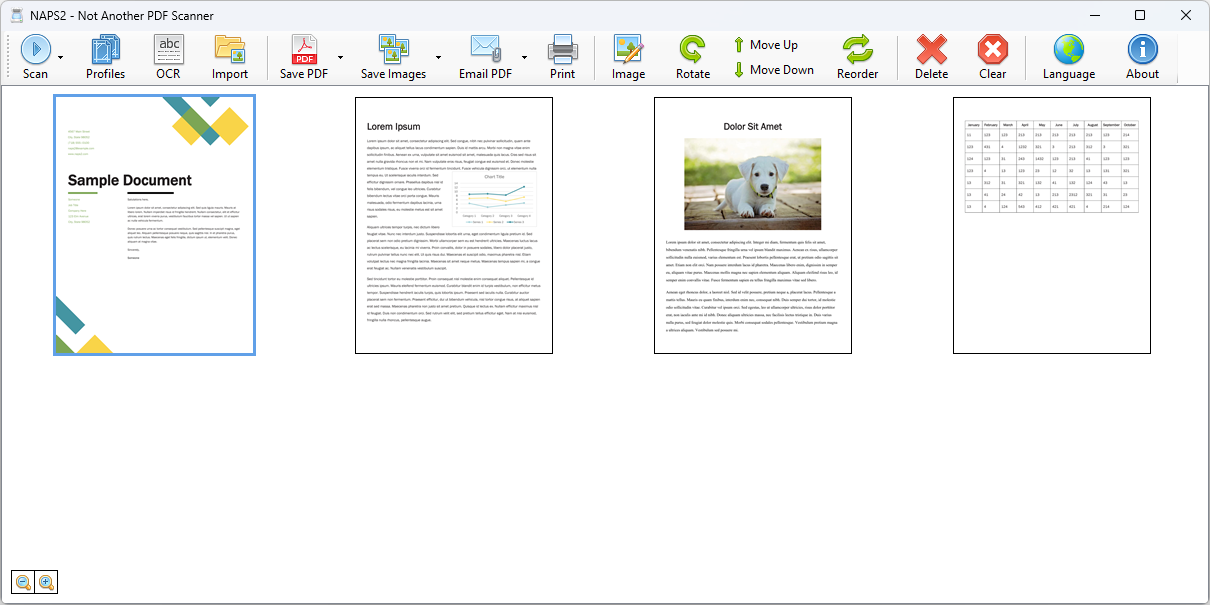
    Die Open Source Software NAPS2 ist die ideale Lösung für alle, die ihr Homeoffice effizienter gestalten möchten. Nach einer einmaligen Einrichtung übernimmt das Programm das Organisieren und Verarbeiten von Scans nahezu vollständig automatisch. Besonders praktisch: Nutzer können individuelle Scan-Profile erstellen und vor jedem Scanvorgang auswählen. So lässt sich beispielsweise ein Profil definieren, bei dem der Text nach dem Scan automatisch per OCR (Optical Character Recognition) erkannt wird – eine enorme Zeitersparnis für alle, die regelmäßig Dokumente digitalisieren.

    Die benutzerfreundliche grafische Oberfläche zeigt alle aktuellen Scans nebeneinander an, wodurch die Seiten ganz einfach per Drag-and-Drop sortiert werden können. Anschließend lassen sich die bearbeiteten Seiten zu einer einzigen PDF-Datei zusammenfügen und speichern – ideal für die schnelle Erstellung von digitalen Unterlagen.

    Diese Software ist besonders für Personen geeignet, die keinen Einzugsscanner besitzen, aber dennoch eine effiziente Lösung für das Scannen und Verarbeiten von Dokumenten benötigen. Sie bietet eine flexible, kostenlose Alternative, ohne auf Komfort und Funktionalität zu verzichten.

    Ob für den privaten oder beruflichen Gebrauch – mit dieser Software wird das Scannen zum Kinderspiel.


  • MTR Account anlegen

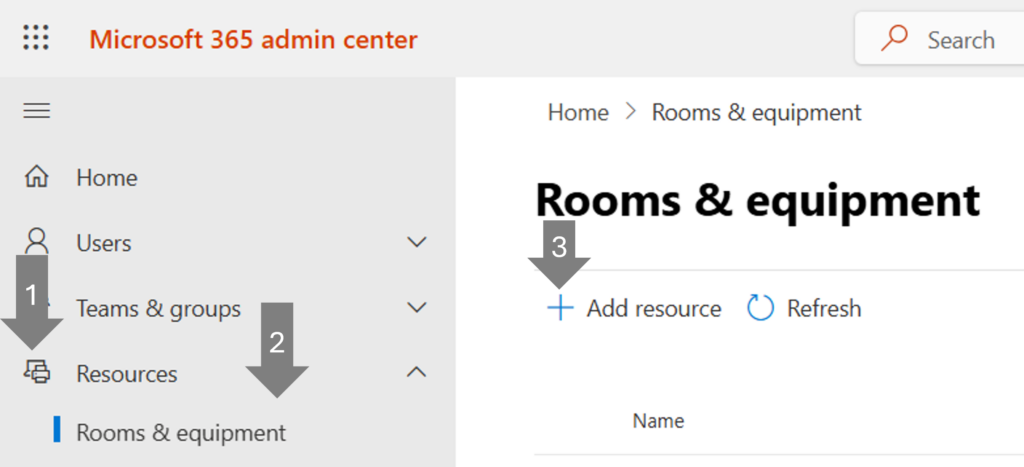
    Für den Betrieb eines Teams Rooms wird eine Teams Rooms Pro/Basic Lizenz benötigt. Der Account wird im M365 admin center (https://admin.microsoft.com/) unter Resources/Rooms & equipment erstellt.

    Account einrichten

    In der geöffneten Sidebar können nun die Details für den neuen MTR-Account eingegeben werden. Es ist dabei zu empfehlen, ein Prefix für alle Meetingräume zu verwenden. So ist eine logische Sortierung zu jedem Zeitpunkt gewährleistet.

    Name-Pattern für MTR-Accounts (Email)

    mtr-<location>-<room number>-<room name>@company.com

    Name-Pattern für MTR-Accounts (Name)

    <room name> <location> <room number> (<capacity>)

    Lizenzen zuweisen

    Nach dem Speichern der neuen Ressource, muss dem Account die Teams Rooms Lizenz zugewiesen werden. Die Lizenz wird ebenfalls im M365 admin center unter Users/Active users zugewiesen.

    In der geöffneten Sidebar kann dann unter Licenses and apps die entsprechende Teams Rooms Lizenz ausgewählt werden. Nach dem Speichern der Lizenz kann dem Raum über die Reset password Funktion in der gleichen Sidebar ein Passwort für den Login auf dem MTR-Gerät zugewiesen werden.

    Der Account ist umgehend einsatzbereit und kann genutzt werden. Die Synchronisation mit dem Exchange Kalender Postfach kann beim ersten Aufstarten einige Minuten dauern.

    Wichtig

    • Teams Rooms Basic Lizenzen sind gratis verfügbar, müssen jedoch ebenfalls über den Microsoft Marketplace bezogen werden.
    • Die Basic Lizenzen haben in der Funktionalität für den Enduser nur wenig Einschränkungen. Die Verwaltung und das Monitoring ist jedoch stark eingeschränkt. Die Basic Lizenzen sollten daher nur für Tests verwendet werden.
    • Im Teams Rooms Pro Management Portal, wie auch im Teams admin center wird der Account erst erscheinen, wenn sich ein zertifiziertes Teams Rooms Gerät das erste mal eingeloggt hat.

  • Globales Team für eine Abteilung

    Eine Firma mit mehreren Standorten will die Möglichkeit schaffen, dass die Abteilung «Technik» einen zentralen Ort hat für den Wissens- und Erfahrungsaustausch.

    Lösungsansatz

    Erstellen eines Teams dem automatisch alle User der entsprechenden Abteilung zugewiesen werden. In Microsoft Entra wird eine M365 Group erstellt. Members werden dynamisch zur Gruppe hinzugefügt anhand des Departement aus dem User Profil. So müssen die User nicht einzeln hinzugefügt werden. Neue User werden ebenfalls automatisch zum Team hinzugefügt. Das minimiert den Administrationsaufwand.

     Im Anschluss wird die Gruppe per PowerShell in ein Team umgewandelt und entsprechend den Anforderungen angepasst.

    1. Neue M365 Group erstellen

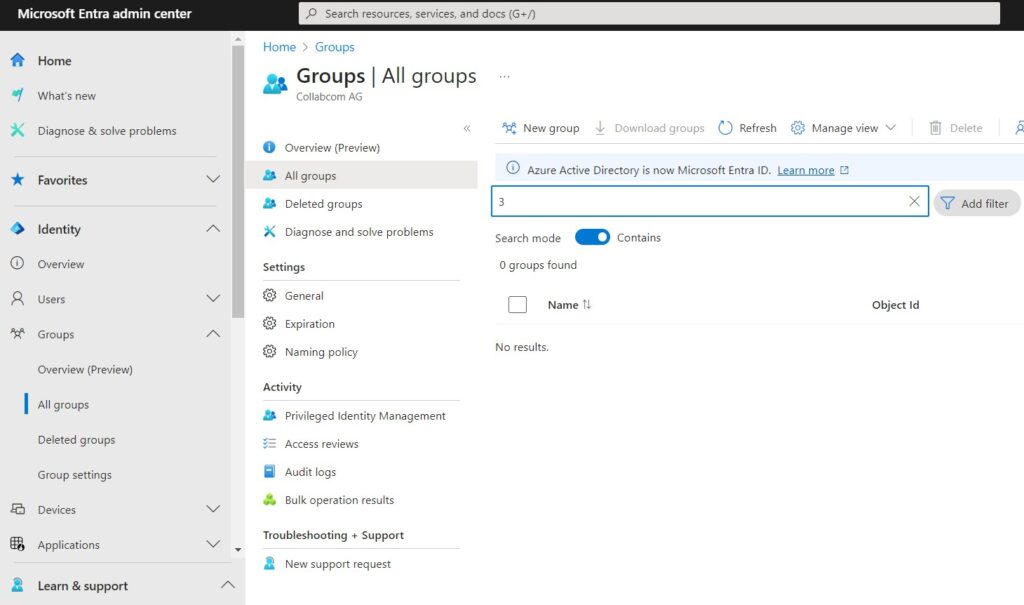
    Öffne das Microsoft Entra admin center: https://entra.microsoft.com/

    Wechsle in der Sidebar zu: Groups –> All groups

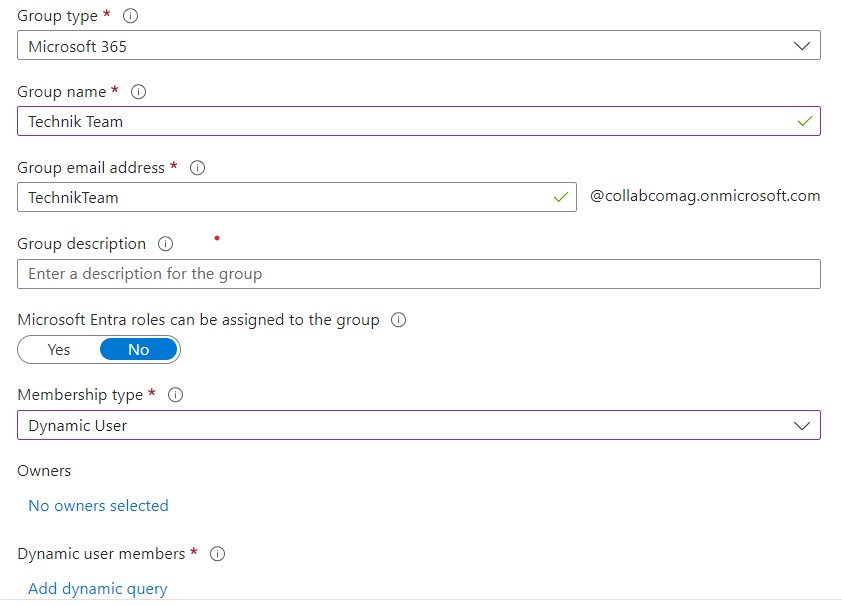
    Klicke auf New Goup um eine neue Gruppe zu erstellen

    Gruppeneinstellungen

    Group typeMicrosoft 365

    Group nameTechnik Team
    Dieser Name wird der Display name der Gruppe und des Teams. Dieser wird auch in allen Suchergebnissen so angezeigt.

    Group email addressTechnikTeam
    Die Adresse wird intern verwendet und kann als Gruppenmailbox verwendet werden.

    Group description
    Diese Beschreibung wird in vielen Detailansichten innerhalb von M365 angezeigt.

    Membership typeDynamic User
    Durch die dynamische Zuweisung wird es möglich User automatisch gemäss Dynamic query hinzuzufügen.

    Owners
    Hier können User hinzugefügt werden, die erweiterte Möglichkeiten haben um die Gruppe zu verwalten. Hier wird in der Regel nicht der Administrator hinzugefügt.

    Klicke auf Add dynamic query um das automatische Hinzufügen von Usern zu konfigurieren.

    Dynamic query konfigurieren

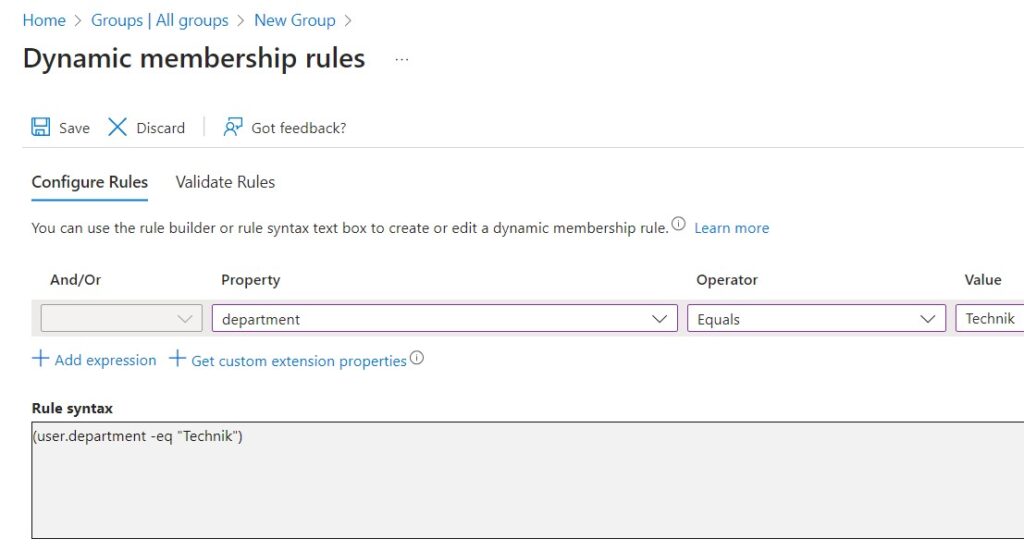
    Microsoft Entra - Dynamic Membership Rules

    Im Tab Configure Rules als Property department auswählen.
    Als Operator Equals setzen.
    Als Value Technik setzen.

    Das Query sucht also automatisch alle User die im Feld Departement den exakten Wert Technik eingetragen haben. Falls in diesem Feld auch mehrere Abteilungen aufgeführt sein können muss die Rule Syntax manuell angepasst werden. 

    Klicke oben rechts am Rule Syntax Feld auf den Edit Button.

    Passe die Syntax wie folgt an

    (user.department -contains "Technik")

    Anschliessend kannst du das Query im Tab Validate Rules mit ausgewählten Usern testen.

    Klicke auf Save und speichere das Query ab.

    Danach gelangst du zurück zu den Gruppen Einstellungen. Klicke auf den Create Button unterhalb des Formulares um die Gruppe zu erstellen.

    Gruppen ID der angelegten Gruppe finden

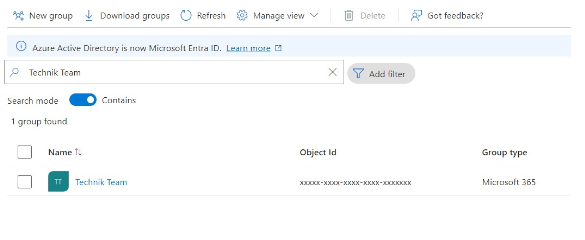
    Suche in der Gruppenübersicht nach der neuen Gruppe (Technik Team).

    Speichere die Object id aus der Tabelle (xxxxx-xxxx-xxxx-xxxx-xxxxxxx)

    Diese ID wird im nächsten Schritt für das Anlegen des neuen Teams in PowerShell gebraucht.

    2. PowerShell Vorbereitungen

    Um das Microsoft Teams Cmdlets zu nutzen müssen die folgenden PowerShell Module installiert sein:

    • PowerShellGet
    • MicrosoftTeams

    Mit dem folgenden Befehl kannst du überprüfen ob die Module installiert sind:

    Get-InstalledModule -Name @('PowerShellGet', 'MicrosoftTeams')

    Fehlende Module installieren

    Wenn die Module nicht installiert sind kriegst du eine Fehlermeldung:

    PowerShellGet Modul installieren:

    Install-Module -Name PowerShellGet -Force -AllowClobber

    MicrosoftTeams Modul installieren:

    Install-Module -Name MicrosoftTeams -Force -AllowClobber

    Gruppe in ein Team Umwandeln

    Verbindung mit Microsoft Teams herstellen

    Nach der Installation der beiden Module kann eine Verbindung mit Microsoft Teams  mit dem unteren Command hergestellt werden. Du wirst unter Umständen aufgefordert deinen Usernamen und dein Passowrt einzugeben. Achte darauf, dass der Account die entsprechenden Rechte hat.

    Connect-MicrosoftTeams

    Neues Team erstellen

    Um die Gruppe umzuwandeln wird ganz einfach ein neues Team erstellt und als Parameter die Object Id der vorher erstellten Gruppe übergeben.

    Dieser Befehl wandelt die M365 Gruppe in ein Team um. Das Team ist nun ersichtlicht in den Clients aller User aus dem Departement «Technik».

  • Hello world!

    Welcome to WordPress. This is your first post. Edit or delete it, then start writing!

    Microsoft Purview: Azure AI Foundry integration with Microsoft Purview for AI

    Purview enablement in AI Foundry, allows Foundry admins to activate Microsoft Purview on their subscription. Once enabled, AI interaction data from all apps and agents flows into Purview for centralized compliance, governance, and posture management of AI data.
    GA date: March CY2026
    Preview date: December CY2025
    Weiter lesen…

    Microsoft Copilot (Microsoft M365): Review PDFs using Copilot context menu and AI actions

    Copilot makes PDF reviews faster and easier. It explains selected text in plain language and lets you customize the prompt for tailored results—so you spend less time switching between apps.
    GA date: January CY2026
    Weiter lesen…

    Microsoft Copilot (Microsoft 365): Edit a Page using Copilot Chat on Mobile

    Mobile users can now use Copilot Chat to edit Pages.
    GA date: February CY2026
    Weiter lesen…

    Microsoft Intune: Assignment filters support for Apple declarative device management (DDM)

    Admins can use assignment filters when targeting Apple DDM policies.
    GA date: January CY2026
    Weiter lesen…

    Microsoft Edge: Enterprise New Tab Page experience

    A modern experience for the New Tab Page (NTP) on Microsoft Edge for Business.
    GA date: January CY2026
    Weiter lesen…

    Microsoft Teams: Select multiple messages to forward

    You can now select up to five messages from a chat or channel and forward them together in one message—preserving both context and order.
    GA date: January CY2026
    Weiter lesen…

    Microsoft Copilot (Microsoft 365): Relight images in Microsoft 365 Copilot

    Edit or enhance the lighting in uploaded or generated images directly in Copilot Chat and the Create experience.
    GA date: January CY2026
    Weiter lesen…

    Microsoft Entra: Microsoft Security Copilot App Lifecycle Management Agent in Microsoft Entra

    Application Lifecycle Management Agent: This agent unifies the entire application lifecycle into one intelligent workflow—replacing multiple disconnected admin tasks with a single, guided experience. It automatically discovers unmanaged private apps using Global Secure Access telemetry, recommends onboarding them to Microsoft Entra, and handles setup with automated naming, tagging, and least-privilege scoping. After onboarding, the agent continuously monitors app usage and permissions, flags unused high privileged apps and proactively notifies owners with clear next steps via Teams or email. Using the data the agent has gathered, it suggests a phased disablement plan that admins can customize to their risk prioritization preferences.
    GA date: January CY2026
    Preview date: December CY2025
    Weiter lesen…

    Microsoft Copilot (Microsoft 365): SharePoint list agent

    Enables effortless list creation for Copilot users through prompts, with intelligent schema generation and setup. This agent helps teams to quickly transform structured information and Copilot responses to Microsoft Lists.
    GA date: January CY2026
    Preview date: December CY2025
    Weiter lesen…

    Outlook: Draft emails using saved email snippets with Quick Parts for Outlook for Windows and web

    Drafting emails is faster and easier with Quick Parts, now available for Outlook for Windows and web. Quick Parts are saved email snippets that can be reused when composing new messages, making it easy to assemble messages with reusable parts.
    GA date: January CY2026
    Weiter lesen…

    Microsoft Teams: Automatic installation and update of Network Device Interface (NDI) in Teams (MAC)

    This update now enables users to install and update the Network Device Interface (NDI) automatically in Microsoft Teams on MAC devices without any manual process. This allows organizations to broadcast audio and video streams from Teams instances to a user’s local network.
    GA date: January CY2026
    Weiter lesen…

    Microsoft Purview: Data Lifecycle Management-New cmdlet to remove retention from inactive mailboxes

    Today, there is not a way to remove retention policies or labels (called a hold in Exchange) from items in inactive mailboxes in bulk. Now we are introducing a PowerShell cmdlet that enables retention policies or labels to be removed in bulk from these items. This removal will not affect legal holds.
    GA date: December CY2025
    Weiter lesen…

    Microsoft Edge: Copilot icon visibility

    Users can now manage the Copilot icon in their toolbar. To hide the icon, right-click the Copilot icon and select “Hide Copilot”. This will open Settings to toggle the icon’s visibility. Admins can control whether the Copilot icon shows in the toolbar using the Microsoft365CopilotChatIconEnabled policy.
    GA date: January CY2026
    Weiter lesen…

    Microsoft Copilot (Microsoft 365): Support permission sync missed in incremental crawl

    Earlier, permissions were synced only in the periodic full crawl which generally ha a default frequency of 1 day for most of the connectors. Now, we have support for doing permission syncs more frequently in an incremental way.
    GA date: June CY2026
    Weiter lesen…

    Microsoft Purview: Compliance Manager-Purview Compliance Manager integration with Microsoft Foundry for automated mapping of AI regulations and evaluation of Compliance controls for Foundry Agents

    This feature in Purview Compliance Manager shall enable customers to automatically access the compliance posture of Agents created in AI Foundry. Customers can map Agents being created in AI Foundry to compliance regulations and assessments in Purview Compliance Manager and get to know the compliance status and improvement actions to be innovative and compliant.
    GA date: January CY2026
    Preview date: December CY2025
    Weiter lesen…

    Microsoft Defender for Office 365: User Report capabilities to Defender for Office Plan 1

    Security admins with Defender for Office 365 Plan 1 can avail the benefits of end user reporting of Teams Messages
    GA date: January CY2026
    Weiter lesen…

    Microsoft Copilot (Microsoft 365): Admins can manage access more precisely with support for nested permissions in Jira, Confluence, and ServiceNow

    Support for hierarchical ACLs for SNOW, Confluence, Jira connectors.
    GA date: April CY2026
    Preview date: March CY2026
    Weiter lesen…

    Microsoft Viva: AI audio overview support for pages and additional languages

    This feature provides additional languages support for AI generated audio overview of top 10 news items in the Viva Connections news reader experience. Additionally, if the SharePoint Knowledge Agent is available in a site, site pages and news posts will now have the AI audio summary experience.
    GA date: December CY2025
    Weiter lesen…

    Microsoft Viva: Update Engage community cover photos in Teams for iOS

    Admins of communities in Viva Engage will be able to update their community cover photo from Teams for iOS. This is already currently supported on Teams for Android or Windows, Mac, on the web.
    GA date: December CY2025
    Weiter lesen…

    Microsoft Teams: Title: Ability for IT admins to customize the user notification strings for recording and transcription

    IT admins can customize the message and privacy link used to notify implicitly or gain explicit consent from meeting participants for the use of recording, transcription during the meeting.
    GA date: January CY2026
    Weiter lesen…

    Microsoft Teams: Report a Suspicious Call in Microsoft Teams

    Microsoft Teams now includes a capability that lets users flag calls they believe are unusual or suspicious. When a call is reported, the signal helps Microsoft strengthen security measures and reduce future unwanted or malicious call activity. This feature empowers users to actively contribute to real-time threat detection, enhancing organizational safety.
    GA date: February CY2026
    Weiter lesen…

    Microsoft Edge: Tracking prevention when browsing InPrivate

    Microsoft Edge is unifying the tracking prevention experience for non-InPrivate and InPrivate browsing windows. Microsoft Edge will use the same tracking prevention setting as a normal browsing window when in InPrivate mode.
    GA date: March CY2026
    Weiter lesen…

    Microsoft Teams: Activity in other accounts and organizations

    Users can view and respond to activity across multiple tenants without switching accounts. You can triage notifications, reply to chats, and pin tenants to the left rail for quick access.
    GA date: February CY2026
    Weiter lesen…

    Microsoft Edge: Tenant Restrictions v2 (TRv2)

    New enforcement to block access from unauthorized Microsoft 365 tenants directly in Microsoft Edge for Business, helping organizations maintain strict compliance and prevent data leakage across tenant boundaries.
    GA date: January CY2026
    Preview date: November CY2025
    Weiter lesen…

    Microsoft Teams: Autocorrect in Teams compose

    Users will now have commonly misspelled words automatically corrected in compose.
    GA date: January CY2026
    Weiter lesen…

    Microsoft Copilot (Microsoft 365): Copilot Shortcuts for Pages on Mobile

    Mobile users can utilize Copilot Shortcuts with suggested prompts to edit a Page.
    GA date: February CY2026
    Weiter lesen…

    Microsoft Purview: Communication Compliance- Alert improvements

    Communication Compliance is improving the capabilities and customization of policy alerts. Admins will be able to customize the alert frequency per policy as well as adjust the email alerts frequency and recipients within the policy creation wizard. Microsoft Purview Communication Compliance provides the tools to help organizations detect regulatory compliance violations (for example SEC or FINRA), such as sensitive or confidential information, harassing or threatening language, and sharing of adult content. Built with privacy by design, usernames are pseudonymized by default, role-based access controls are built in, investigators are opted in by an admin, and audit logs are in place to ensure user-level privacy.
    GA date: January CY2026
    Weiter lesen…

    Microsoft Viva: Engage: Detect moderated themes in images

    Engages theme moderation feature is a powerful AI tool to monitor and moderate content. With this update, images can now match to themes, just like text.
    GA date: March CY2026
    Preview date: January CY2026
    Weiter lesen…

    Outlook: Book a Workspace when Creating an Event

    When creating an event, you can now book a workspace directly from the location field by searching or tapping Browse Workspaces. This feature is only available if you have workspace bookings enabled in settings and by your IT admin.
    GA date: December CY2025
    Weiter lesen…

    Outlook: Run rule over a specific folder

    Run Rule on Specific Folder enables users to manually apply an existing rule to a chosen folder instead of running it only on incoming mail in Inbox. #newoutlookforwindows
    GA date: January CY2026
    Weiter lesen…

    Microsoft Edge: Performance settings update and feature name changes

    Efficiency mode feature name will change to energy saver and efficiency mode for PC gaming name will be renamed PC gaming boost to better describe the feature benefits. The new names will be in browser performance settings after the update.
    GA date: January CY2026
    Weiter lesen…

    Microsoft Copilot (Microsoft 365): Meeting Prepare from Up Next

    Get timely reminders in Outlook mobile to prepare for your meetings with Copilot. The Up Next card now offers a Prepare option so you can get ready with one tap.
    GA date: December CY2025
    Weiter lesen…

    Microsoft Teams: Organization Trust Score for Apps and Agents

    Today, IT admins manually review trust data for Teams apps and agents in the Teams admin center to ensure they meet organizational security, privacy, and compliance standards. This feature introduces a scalable, automated evaluation process. Admins can define their organization’s trust requirements once, and the system will automatically assess each app and agent—generating a Trust Score and detailed evaluation report tailored to those requirements. This enables faster, more consistent decision-making by clearly identifying which apps and agents meet the organization’s standards and where further review is needed.
    GA date: February CY2026
    Weiter lesen…

    Microsoft Purview: Purview SDK embedded in Agent Framework SDK

    Purview SDK embedded in Agent Framework SDK enables developers to seamlessly integrate enterprise-grade security, compliance, and governance into the AI agents they build. This integration enables automatic classification and protection of sensitive data, prevents data leaks and oversharing, and provides visibility and control for regulatory compliance—empowering organizations to confidently and securely adopt AI agents in complex environments.
    GA date: March CY2026
    Preview date: November CY2025
    Weiter lesen…

    Windows 365: Frontline in Shared mode availability for Switzerland North, Switzerland West, Norway East, Norway East, Norway West, UAE central, UAE north

    Windows 365 Frontline in Shared mode availability for Switzerland North, Switzerland West, Norway East, Norway East, Norway West, UAE central, UAE north
    GA date: December CY2025
    Weiter lesen…

    Microsoft Purview: Information Protection-Azure AI Search honors Purview labels and policies

    Azure AI Search now ingests Microsoft Purview sensitivity labels and enforces corresponding protection policies through built-in indexers (SharePoint, OneLake, Azure Blob, ADLS Gen2). This enables secure, policy-aligned search over enterprise data, enabling agentic RAG scenarios where only authorized documents are returned or sent to LLMs, preventing data oversharing and aligning with enterprise data protection standards.
    GA date: June CY2026
    Preview date: November CY2025
    Weiter lesen…

    Microsoft Purview: Information Protection-Email attachment Preview in Activity Explorer

    We’re enhancing Activity Explorer to provide greater visibility into sensitive data flagged in Exchange Online. Previously, only the message body was viewable, which limited insight into flagged content. With this update, admins will be able to preview email attachments directly within Activity Explorer—without needing to download the email.
    GA date: January CY2026
    Preview date: December CY2025
    Weiter lesen…

    Microsoft Purview: New Microsoft Purview Data Security Posture Management Experience

    At Ignite, Microsoft is introducing a major evolution of Purview Data Security Posture Management (DSPM) to help organizations strengthen data security and confidently embrace AI. The new DSPM experience unifies visibility and control across traditional data and AI-driven environments, delivering outcome-based guided workflows that turn insights into actionable steps—so teams can prioritize risks and remediate faster. It brings AI observability, enhanced posture reporting, and intelligent Security Copilot agents to automate tasks like triage and policy management. Plus, Purview now extends coverage beyond Microsoft data with third-party signals from partners like BigID, Cyera, OneTrust, and Varonis, giving security teams a single, streamlined view of sensitive data across clouds and platforms. Together, these innovations make DSPM the central hub for managing data security posture in the era of AI. We are also extending Data Risk Assessments to Fabric and to item-level analysis with new remediation actions like bulk disabling of overshared SharePoint links.
    GA date: April CY2026
    Preview date: December CY2025
    Weiter lesen…

    Microsoft Copilot (Microsoft 365): Use Copilot to Share with Summary for OneDrive files in Windows

    We’re bringing the power of Microsoft 365 Copilot directly into your daily file experience in Windows. With this feature, users can summarize files and send the summary within the share dialog. This feature will be available in File Explorer and OneDrive Activity Center.
    GA date: January CY2026
    Weiter lesen…

    Microsoft Copilot (Microsoft 365): Microsoft Copilot (Microsoft 365): Query Bitbucket Pull Requests with Copilot Connectors

    Customers can now connect Microsoft 365 Copilot to Bitbucket with Copilot connectors to query knowledge base content and pull requests.
    GA date: January CY2026
    Weiter lesen…

    Microsoft Copilot (Microsoft 365): Model Selector in Microsoft 365 Copilot

    The Model Selector in Microsoft 365 Copilot gives users more control over reasoning depth, enabling automatic reasoning for simple tasks and explicit control when desired. The three modes that are supported as part of GPT-5 are: Auto (default) – system decides how long to think, Quick response – answers right away, Think deeper – Thinks longer for better answers.
    GA date: December CY2025
    Weiter lesen…

    Microsoft Copilot (Microsoft 365): Scheduling with Copilot

    Scheduling with Copilot: Users can now schedule meetings directly from chat. Simply ask Copilot to schedule a meeting with colleagues, and it will find available times, book rooms, draft agendas, and send invites—all within the chat experience. This feature will roll out in phases and is expected to be generally available in Copilot chat across all endpoints for users with a Microsoft 365 Copilot license in the coming months.
    GA date: December CY2025
    Weiter lesen…

    Microsoft Copilot (Microsoft 365): Scheduled prompts for Web tab

    Enables users to schedule recurring prompts in the Web tab
    GA date: December CY2025
    Preview date: November CY2025
    Weiter lesen…

    Microsoft Copilot (Microsoft 365): Updated UI for Copilot Chat entry point in Word, Excel and PowerPoint apps

    We are updating the entry point user interface for Copilot Chat. The Copilot Chat entry point button will move out of the app ribbon to the app canvas to help with discoverability and use within the context of the file. This update will apply to Microsoft 365 users of Word, Excel and PowerPoint who are eligible for Copilot Chat across web, mobile and desktop.
    GA date: December CY2025
    Weiter lesen…

    Microsoft Copilot (Microsoft 365): Now smarter with visuals: Declarative Agents leverage embedded images for richer, more accurate answers

    Declarative Agents have been enhanced to interpret and ground responses using images embedded in files such as Word documents (.docx), PowerPoint presentations (.pptx), and PDFs. This capability allows the agent to extract insights from visual elements like charts, diagrams, and screenshots, ensuring that answers are not only text-based but also informed by graphical context. By combining textual and visual understanding, Declarative Agents deliver more comprehensive and contextually accurate responses for complex queries.
    GA date: December CY2025
    Weiter lesen…

    Microsoft Entra: ID Account Recovery

    Self-Serv Account Recovery for tenants using Passkey.Account Recovery from Total Loss using Verified ID with Face Check
    GA date: June CY2026
    Preview date: November CY2025
    Weiter lesen…

    Microsoft 365 admin center: Copilot settings – readiness

    Copilot readiness in the Microsoft 365 admin center provides a centralized experience for applying Microsoft’s recommended settings, policies, and actions for Copilot. It organizes these into predefined packages so admins can quickly deploy Copilot securely and confidently.
    GA date: January CY2026
    Preview date: December CY2025
    Weiter lesen…

    Microsoft Viva: Search Engage conversations in Teams mobile

    Users will be able to search for Viva Engage conversations directly in the Viva Engage app for Teams.
    GA date: November CY2025
    Weiter lesen…

    Microsoft Copilot (Microsoft 365): Microsoft 365 Copilot – Chat & Search Browser Extension for Chrome

    The Microsoft 365 Copilot browser extension for Chrome brings Copilot Chat and Search directly into the browser, enabling users to ask questions, summarize webpages, and search enterprise content without switching tabs. This improves productivity, reduces context switching, and provides secure, compliant in-browser AI assistance for Microsoft 365 users.
    GA date: February CY2026
    Weiter lesen…

    Microsoft Purview: Data Loss Prevention- Admin units support for SharePoint Online

    Delegate management and remediation authority for different people in different regions or organization units with role-based access control (RBAC). For example, German investigators should be able to investigate alerts and audit events for only German users. This update extends support to SharePoint for Microsoft 365.
    GA date: December CY2025
    Weiter lesen…

    Microsoft Teams: Network Device Interface (NDI) bandwidth increase

    Microsoft Teams will soon increase the bandwidth when Network Device Interface (NDI) is used with Teams meetings, webinars, or town halls. When an NDI feed is subscribed within the meeting, the bandwidth will automatically increase without the need to pin or spotlight select users for prioritization. Customers can experience up to 8 distinct 1080p NDI streams based on network conditions.
    GA date: January CY2026
    Weiter lesen…

    Microsoft Copilot (Microsoft 365): Natural language support for Scheduling prompts

    This feature allows users to simply express their intention conversationally, and Copilot infers their intention and creates a scheduled prompt automatically.
    GA date: December CY2025
    Preview date: November CY2025
    Weiter lesen…

    Microsoft Copilot (Microsoft 365): Copilot Chat in Outlook expands to reason over inbox, calendar, and enterprise data

    Copilot Chat in Outlook expanding to support reasoning over a user’s entire inbox, calendar and other enterprise data for Microsoft 365 Copilot Chat users (without a Microsoft 365 Copilot license).
    GA date: January CY2026
    Weiter lesen…

    Microsoft Copilot (Microsoft 365): Edit Scheduled prompts

    Enable customers to edit the scheduled prompt schedule
    GA date: December CY2025
    Preview date: November CY2025
    Weiter lesen…

    Outlook: Calendar Conditional Formatting in New Outlook

    Users can now apply basic conditional formatting rules to the calendar in new Outlook, allowing events and appointments to be color-coded based on sender, location, attendees, and more. #newoutlookforwindows
    GA date: January CY2026
    Weiter lesen…

    Microsoft Copilot (Microsoft 365): Scheduled prompts for Agents

    Enables users to schedule recurring prompts to declarative agents like Analyst, Idea Coach and more.
    GA date: December CY2025
    Preview date: November CY2025
    Weiter lesen…

    Outlook: Filter Out Declined Meetings in Outlook Mobile

    You can now declutter your calendar by hiding declined meetings. If you’ve enabled “Show declined meetings” in New Outlook or Outlook for the Web, you’ll see a setting in Outlook Mobile to hide them for a simpler view.
    GA date: December CY2025
    Weiter lesen…

    Microsoft Copilot (Microsoft 365): Your Command Center for AI Success

    The refreshed Copilot landing page in Microsoft 365 admin center gives an at-a-glance view of your Copilot journey across Chat, Agents, and M365 Copilot. It includes success metrics for each pillar, new metrics like active chat users, assisted hours, and satisfaction rate, plus multi-signal, personalized and actionable insights to drive adoption. We’ve added a security pivot for Purview actions and centralized Copilot usage reports under a new usage pivot.
    GA date: January CY2026
    Preview date: November CY2025
    Weiter lesen…

    Microsoft Copilot (Microsoft 365): Steer your presentation length, tone, style, and images when creating with Copilot.

    You can now adjust the length of your presentation, the tone of your narrative, the style of your slides, and leverage AI-generated images when creating with Copilot.
    GA date: December CY2025
    Weiter lesen…

    Microsoft Forms: Enable Sensitivity Labels

    Microsoft Forms will enable sensitivity labels, empowering organizations to control access and manage information protection directly within Forms. Authors and co-authors will be able to manually assign or edit sensitivity labels on forms, ensuring that only users with appropriate permissions can access form design and response pages. Sensitivity labels will also be inherited by Excel files generated from Forms, maintaining consistent data protection across exported content.
    GA date: December CY2025
    Weiter lesen…

    Outlook: User-initiated Copilot insights in classic Outlook

    Users can manually select text and ask Copilot to help provide relevant information.
    GA date: December CY2025
    Preview date: November CY2025
    Weiter lesen…

    Microsoft Teams: Troubleshoot meetings and calls with automatic issue identification and recommendations

    Administrators can troubleshoot Teams meetings and calls in Teams admin center with ease with a streamlined flow, meeting quality issues, and detailed telemetry.
    GA date: January CY2026
    Weiter lesen…

    SharePoint: Page Agent

    The SharePoint Page Agent is a declarative agent that enables users to create and refine SharePoint pages directly within BizChat or other Copilot apps. It seamlessly integrates SharePoint authoring into everyday conversations, eliminating the need to switch apps or manually open SharePoint. With this feature, users can generate structured content such as meeting recaps, announcements, and project updates, create SharePoint pages instantly from chat.
    GA date: November CY2025
    Preview date: November CY2025
    Weiter lesen…

    Microsoft Teams: Enhancements to channel agents

    Each channel can have a dedicated agent that draws on the channel’s knowledge to act as a domain expert for the team. New enhancements enable the agent to use files from the channel’s SharePoint when responding to queries, create ad hoc status reports configured through natural language, and generate new workback plans that can be added to Planner. In addition, new controls in Teams Admin Center allow admins to disable automatic agent creation.
    GA date: November CY2025
    Weiter lesen…

    Planner: Available in Outlook

    Planner in Outlook brings all your tasks, plans, and the new Project Manager agent directly into your inbox, so you can manage work where you already work.
    GA date: January CY2026
    Weiter lesen…

    Microsoft Copilot (Microsoft 365): Semantic Goodbye word for voice in Microsoft 365 Copilot

    Now users can close a voice session on Windows by simply saying bye or goodbye when they want to close voice session. This, paired with «Hey Copilot» wake word, provides them with complete hands-free experience for voice in Microsoft 365 Copilot on Windows devices.
    GA date: December CY2025
    Preview date: November CY2025
    Weiter lesen…

    Microsoft Teams: Simplified controls to manage external collaboration

    Admins have access to a new overview page in the Teams Admin Center under the external collaboration section. This page allows admins to review and modify their organization’s external collaboration settings. To make changes, admins can use a guided flow and select either the open or controlled preset modes, or choose to customize the settings.
    GA date: February CY2026
    Weiter lesen…

    Microsoft Teams: Shared call history in Queues app

    Queues app now supports shared history for all missed, incoming, and outgoing calls in a queue. This new feature provides greater visibility and collaboration by allowing users to view a complete call history across the team. Shared history can be enabled by your Teams admin, who can choose to grant access to either: All members of the queue, or Only authorized users
    GA date: January CY2026
    Weiter lesen…

    Microsoft Copilot (Microsoft 365): Simplified Agent Creation experience

    Drastically simplified first run experience and guide users quickly from idea to success. Faster responses and improved performance for a smoother experience. Familiar, intuitive flow that mirrors Copilot’s simplicity.
    GA date: December CY2025
    Weiter lesen…

    Microsoft Teams: Interpreter in Microsoft Teams calls

    We’re expanding the Interpreter agent in Microsoft Teams to include real-time speech-to-speech interpretation for Teams calls. This brings the same functionality previously available in meetings to calls, enabling users to speak and listen in up to nine supported languages. Interpreter helps eliminate language barriers and fosters seamless collaboration across global teams. For a more inclusive experience, users can also opt to have Interpreter simulate their personal voice.
    GA date: January CY2026
    Weiter lesen…

    Microsoft Copilot (Microsoft 365): Voice chats can reference Memory

    While users are in M365 Copilot voice chat, Copilot can respond using existing memories already stored in user personalization settings. Users cannot modify/edit their memories from voice chats yet due to privacy considerations. All memories that can be used for Copilot responses in voice chat are visible and manageable by users in their Personalization settings.
    GA date: January CY2026
    Preview date: November CY2025
    Weiter lesen…

    Microsoft Copilot (Microsoft 365): Project Manager Agent in M365 Copilot

    The new Project Manager agent in Microsoft 365 will help you plan, organize, and manage work more efficiently. We’re starting with core task and plan management features to simplify project tracking and will introduce additional advanced project management capabilities over time.
    GA date: March CY2026
    Preview date: January CY2026
    Weiter lesen…

    Planner: Project Manager agent in basic plans

    Project Manager agent will now be available for M365 Copilot licensed users in all Planner plans, including basic plans.
    GA date: April CY2026
    Preview date: January CY2025
    Weiter lesen…

    Microsoft Purview: Data Security Investigations – Introducing integration with Data Security Posture Management and deepening integration with Defender XDR, Insider Risk Management

    Data Security Investigations (DSI) insights are now being incorporated into Data Security Posture Management to support the prevention of sensitive content exfiltration. Additionally, DSI integrations with Defender XDR and Insider Risk Management are being enhanced, reflecting customer feedback received during the Public Preview phase.
    GA date: February CY2026
    Preview date: November CY2025
    Weiter lesen…

    Microsoft Copilot (Microsoft 365): Planner capabilities in Copilot chat (M365 Copilot)

    You’ll soon be able to create Planner tasks and view task details directly in Microsoft 365 Copilot chat. This integration makes it easy to manage and update your tasks seamlessly across Copilot and Planner without switching apps.
    GA date: January CY2026
    Weiter lesen…

    Microsoft Purview: DSPM data risk assessments: item-level investigation & remediation

    Microsoft Purview Data risk assessments now support item-level investigation and remediation of SharePoint data. Item-level insights like sensitivity label and sharing links created help users identify potentially overshared items. Users are empowered to remediate overshared items by resolving, notifying, applying a sensitivity label, or removing sharing links for selected item(s). This helps organizations proactively reduce data exposure, strengthen compliance posture, and ensure sensitive data are only accessible to the right people.
    GA date: February CY2026
    Preview date: November CY2025
    Weiter lesen…

    Planner: Custom Templates

    Custom templates let you create reusable, pre-designed layouts tailored to your organization’s needs, ensuring consistency and saving time. They provide flexibility to standardize content while allowing easy customization for specific scenarios.
    GA date: January CY2026
    Weiter lesen…

    SharePoint: Get relevant information from Lists in Knowledge Agent

    Users will be able to find relevant information, matching items and get answers from Microsoft Lists using Knowledge Agent.
    GA date: February CY2026
    Preview date: January CY2026
    Weiter lesen…

    Outlook: Triage your inbox on-the-go with Copilot voice for Outlook mobile

    Stay on top of your inbox with the new Copilot voice experience in the Outlook mobile app. Copilot starts by summarizing your most recent unread emails and then suggests actions like flagging, pinning, archiving, deleting or drafting a reply – all without the hassle of navigating your inbox by hand. You can interrupt or redirect Copilot at any point in the conversation.
    GA date: January CY2026
    Preview date: November CY2025
    Weiter lesen…

    Outlook: Enriching profile cards with custom, organization-specific properties

    Customers can now customize their M365 profile cards by adding custom properties unique to their organization. These properties can be sourced from external systems like HR platforms, enriching user profiles with relevant organizational details. Tenant admins can configure these properties with a display name and icon, which will appear in the Contact Information section of the profile cards.
    GA date: January CY2026
    Weiter lesen…

    Excel: Python in Excel

    Python in Excel allows you to bring the capabilities of Python directly into the Excel grid. As a part of this feature, users will be able to add Python formulas directly into their workbooks without any installation required. These Python formulas will be run by Excel in a secure container on the Microsoft Cloud with enterprise-level security as a compliant Microsoft 365 connected experience.
    GA date: January CY2026
    Weiter lesen…

    Microsoft Entra: Cross-tenant security group synchronization

    We’re introducing cross-tenant group synchronization, a new capability that enables organizations to synchronize security groups across Microsoft Entra tenants. This feature simplifies collaboration scenarios by allowing shared access to resources across tenants while maintaining centralized group management. It also streamlines administration of multiple tenants by centralizing group membership control, reducing duplication and manual overhead.
    GA date: January CY2026
    Preview date: January CY2026
    Weiter lesen…

    Outlook: Hide Declined Meetings in Outlook Mobile

    If you have enabled Show declined events in New Outlook, you can choose to hide declined events in your Outlook iOS or Android app. Go to Settings > Calendar > Hide Declined Events. This will filter out declined events from your mobile calendar, while keeping those events visible in New Outlook.
    GA date: December CY2025
    Weiter lesen…

    Microsoft 365 admin center: New Admin Control for Turning off People Skills

    This is a new control that tenant admins may use to turn off People Skills User Experiences for the entire organization, user group subsets, or individual users. This control can also be used to selectively deploy People Skills to a small group of pilot users before broader deployment to the rest of the tenant.
    GA date: December CY2025
    Weiter lesen…

    Microsoft Copilot (Microsoft 365): Ticket Status updates more frequently in ServiceNow Tickets Copilot Connector

    ServiceNow Tickets Copilot connector did not use to correctly update the ticket status because of not ingesting inactive tickets. But now, the connector updates the change in ticket status more frequently. Additionally, users can now edit the data query filter to include inactive tickets even for existing connections. By default, copilot connectors now ingest both active & inactive tickets to ensure better quality responses in Copilot connectors.
    GA date: January CY2026
    Preview date: December CY2025
    Weiter lesen…

    Microsoft Defender for Office 365: Zero-hour auto-purge (ZAP) Teams protection capabilities to Defender for Office Plan 1

    Security admins with Defender for Office 365 Plan 1 can utilize Zero-hour auto purge (ZAP) and admin quarantine for zapped Teams messages.
    GA date: January CY2026
    Weiter lesen…

    SharePoint: Microsoft designed dark themes for SharePoint Sites

    Introduce two official Microsoft-designed dark themes for SharePoint sites, delivering a modern, elegant look with improved visual comfort and accessibility. These themes provide consistent branding options and enhance user experience in low-light environments while maintaining compliance with Microsoft design standards.
    GA date: February CY2026
    Weiter lesen…

    Microsoft Purview: Data Loss Prevention- Show remote machine information on File Copy to Remote Desktop

    Admin should be able to see destination machine information when end-user copy a sensitive file to a remote machine through RDP.
    GA date: January CY2026
    Preview date: December CY2025
    Weiter lesen…

    Microsoft Edge: New WebGL software backend

    Microsoft Edge, on Windows systems without a physical GPU, will use the Windows Advanced Rasterization Platform (WARP) rasterizer for WebGL workloads. Prior versions use SwiftShader. This scenario is most common associated with headless environments and virtual machines. On non-Windows platforms, a physical GPU will be required for WebGL moving forward.
    More info: https://nam06.safelinks.protection.outlook.com/?url=https%3A%2F%2Flearn.microsoft.com%2Fen-us%2Fwindows%2Fwin32%2Fdirect3darticles%2Fdirectx-warp&data=05%7C02%7Cv-zbeg%40microsoft.com%7Cf203f7982a30414cb90a08de1e5e8d5d%7C72f988bf86f141af91ab2d7cd011db47%7C1%7C0%7C638981588692598882%7CUnknown%7CTWFpbGZsb3d8eyJFbXB0eU1hcGkiOnRydWUsIlYiOiIwLjAuMDAwMCIsIlAiOiJXaW4zMiIsIkFOIjoiTWFpbCIsIldUIjoyfQ%3D%3D%7C0%7C%7C%7C&sdata=bK82pFEbE%2BVGvJO%2FbPYUuc8OmyOrOLCY2bhdmks936Q%3D&reserved=0
    GA date: January CY2026
    Weiter lesen…

    Microsoft Teams: Resizable Gallery in Teams Meetings

    Resize the video gallery in Teams meetings to see more people when content is being shared
    GA date: January CY2026
    Weiter lesen…

    SharePoint: Site Branding Governance via PowerShell

    Empower tenant admins to centrally manage SharePoint site branding using PowerShell scripts. This feature enables organizations to enforce consistent branding, apply enterprise themes to individual sites, disable custom branding on specific sites, and audit branding changes – ensuring branding compliance and a unified brand experience across all SharePoint sites.
    GA date: December CY2025
    Weiter lesen…

    Microsoft Teams: App centric management in Teams Admin Center to manage the Apps access for tenants, end-users, and groups in GCC

    App centric management introduces new admin settings to control who in the tenant can install Teams apps. First, admins can set a default value for new apps that are published to Teams app store. Second, admins can edit the availability of an app to ‚All users can install‘, ‚Specific users and groups can install‘, or ‚No user can install‘. This feature evolves the existing app permission policies and provides admins with the ability to manage access to the app individually. The app permission policies for existing customers are migrated to maintain existing app availability in the tenant.
    GA date: January CY2026
    Weiter lesen…

    Microsoft Purview: Data Loss Prevention- Actionable Email Notifications for Enhanced Incident Remediation

    Microsoft Purview Data Loss Prevention end-user email notification is getting advanced incident remediation capabilities: actionable email notifications. This new feature allows end users to take remediation actions directly from their mailbox, streamlining the remediation process. The end users will be able take remediation actions on files on OneDrive and SharePoint that caused a policy match. Key actions now available in our email notifications include – stop sharing file, delete file, apply label, override the policy, report false positive and unable to take action.
    GA date: January CY2026
    Weiter lesen…

    Microsoft Purview: Insider Risk Management-Priority content support for Risky AI usage

    With this update, Risky AI usage policy template will support priority content. Customers can define Sensitive Info Types (SITs), Trainable Classifiers, Sensitivity Labels as priority content, and get alerted only when the activity matches the selected priority content. Microsoft Purview Insider Risk Management correlates various signals to identify potential malicious or inadvertent insider risks, such as IP theft, data leakage, and security violations. Insider Risk Management enables customers to create policies based on their own internal policies, governance, and organizational requirements. Built with privacy by design, users are pseudonymized by default, and role-based access controls and audit logs are in place to help ensure user-level privacy.
    GA date: January CY2026
    Weiter lesen…

    Microsoft Copilot (Microsoft 365): Use Copilot with OneDrive files in Finder

    We’re bringing the power of Microsoft 365 Copilot directly into your daily file management experience in macOS. With this update, users can interact with Copilot in Finder to ask questions about their OneDrive files.
    GA date: December CY2025
    Weiter lesen…

    Microsoft Purview: Endpoint Data Loss Prevention- Show customized message or hyperlink for multiple file toast

    With this feature when multiple files are involved in a DLP enforcement action, the policy tip will now show multiple files and their respective status.
    GA date: January CY2026
    Preview date: November CY2025
    Weiter lesen…

    Microsoft Teams: VDI optimization monitoring in Best practice configurations dashboard

    Administrator can monitor which locations and users across their organization are facing meeting quality issues due to unoptimized VDI.
    GA date: January CY2026
    Weiter lesen…

    Microsoft Purview: Endpoint Data Loss Prevention- Mac device and device group-based policy scoping support for Endpoint DLP

    Currently you can create Purview Endpoint DLP policy and assign to specific users or user groups. This feature will allow you to create and assign policy based on both users and machines. You can use this feature to achieve different policies for same user on different Mac devices.
    GA date: December CY2025
    Weiter lesen…

    Microsoft Teams: Enhancements to Interpreter and multilingual meeting experience

    First, spoken language is now automatically detected and updated across Interpreter, live captions, and live transcription when Interpreter is enabled, keeping all speech features consistent with the language being spoken – no manual setup required. When Interpreter is disabled, live captions and transcription will still work, but auto-update spoken language will not be available, which may result in gibberish or inaccurate content if participants switch languages during the meeting. Next, a new “preparing” status provides clear visual feedback while Interpreter initializes, helping users know when the system is ready -especially important for multilingual meetings. Lastly, Interpreter settings have also been improved with concise explanations for each configuration and field, making setup easier and minimizing confusion.
    GA date: December CY2025
    Weiter lesen…

    Microsoft Copilot (Microsoft 365): Agent Mode in Excel

    Agent Mode lets you build and edit workbooks side by side with Copilot. When you’re updating budgets, creating financial models, or analyzing data, Agent Mode uses Excel’s most powerful tools like tables, charts, PivotTables, and formulas to help you get the job done.
    GA date: December CY2025
    Weiter lesen…